The experience
The KaryaYogi app tourकार्ययोगी ऐप का दौरा
Home, Leave, Countdowns, Vault and Tools — the five surfaces an officer lives in.होम, लीव, काउंटडाउन, वॉल्ट और टूल्स — पाँच सतहें जिनमें अधिकारी रहते हैं।
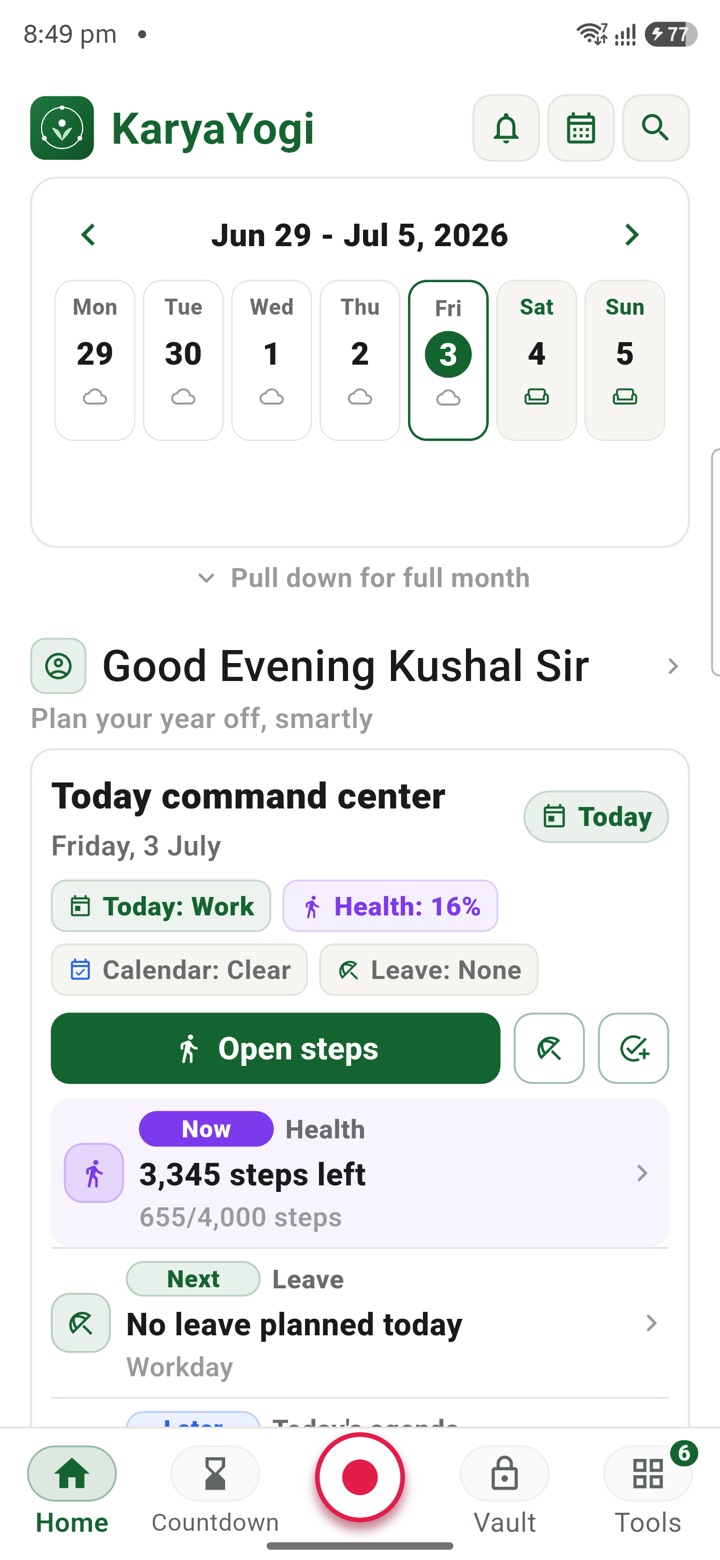
Where the day starts
Home: your landing surface
Open KaryaYogi and you land on Home. It is the first of five surfaces along the bottom of the screen, and the one you return to between tasks. From Home you reach the other four with a single tap, so nothing is more than one move away.
The whole app runs offline-first. Home works with the SIM removed and no signal, because your planning data lives on the device, not on a server you have to reach. If you use the optional paid sync, changes reconcile later; if you do not, the app is fully usable on its own.
- Five fixed surfaces along the bottom: Home, Leave, Countdowns, Vault, Tools
- One tap moves between any two surfaces
- Works with the SIM removed, no signal needed
- No account is required to open the app or use any surface
Planning against the clock
Leave and Countdowns: time you want to track
Two surfaces handle dates. Leave is a private planner for thinking through your own leave: you record and lay out your plans for yourself, on your device. It does not connect to HRMS, eOffice or any authorised leave system, and it does not apply for, file or submit anything on your behalf. What it produces is a private draft that helps you plan, nothing that any office will act on.
Countdowns tracks the dates you care about. You set a date, and the surface counts down to it, so a deadline or milestone you fix yourself stays visible as the day moves. Like every planning surface, it holds your own entries and reports only to you.
- Leave is a private, offline leave planner, kept on your device
- Leave never files or syncs to HRMS, eOffice or any official system
- Countdowns counts down to dates you set yourself
- Both surfaces produce private notes and estimates, not official records
The working core
Tools: planning tools for the actual work
Tools is where most of the day happens. It opens the full set of planning and productivity tools, all free and all offline-first. You move here from Home when there is real work to do, then step back out when you are done.
Every tool is a planning aid. It produces private drafts, estimates and calculations for your own use. No tool submits or files anything to an official channel, and none replaces a system of record such as pay slips, sanction files or an APAR. Treat what a tool gives you as your working copy, not an authorised output.
- The full tool library, free to use, with no ads and no trackers
- Each tool works offline, with the SIM removed
- Output is a private draft or estimate for your own use
- Nothing is submitted or filed to any official system
Closing up
Vault: locking down what you keep
Vault is where sensitive material stays protected. It is an AES-256 encrypted local store, held on the device and keyed to you. You lock the app with a biometric or a PIN, so what sits in Vault stays behind that lock when you put the phone down.
You stay in control of the data. A one-tap encrypted backup produces a file you hold; optional sync, if you turn it on, is encrypted and hosted in India under your account. If you need to hand the device on or wipe it, Emergency Reset clears all local KaryaYogi data from it. Under the DPDP Act, 2023, you are the Data Principal, and the surface is built so that control sits with you.
- AES-256 encrypted local vault on your device
- App lock by biometric or PIN
- One-tap encrypted backup produces a file you control
- Emergency Reset wipes all local KaryaYogi data from the device
Carry your desk in your pocketअपनी डेस्क, अपनी जेब में
The Android APK below is the legacy direct-download edition. Use it only for an installation originally obtained from this website. Google Play and iOS releases follow separate testing and review tracks.
नीचे दिया गया Android APK पुराना सीधे डाउनलोड वाला संस्करण है। इसे केवल उसी इंस्टॉलेशन के लिए उपयोग करें जो इस वेबसाइट से लिया गया था। Google Play और iOS रिलीज़ की अलग परीक्षण और समीक्षा प्रक्रिया है।
Legacy package in.karyayogi.app · v1.55.59 (8195) · 144 MB · Android 8.0+