Leave & Calendar Rolling out
Calendar Viewकैलेंडर दृश्य
Bring your phone calendar into Karya Yogi, plan duty days, meetings, holidays, leave and tasks privately, and keep Karya Yogi data away from Google, Apple or other phone calendars.Duty days, personal leave plans, holidays, task dates और officer follow-ups को day, month और year view में देखें।
Bring your phone calendar into Karya Yogi, plan duty days, meetings, holidays, leave and tasks p
What it does
The tool, in plain terms
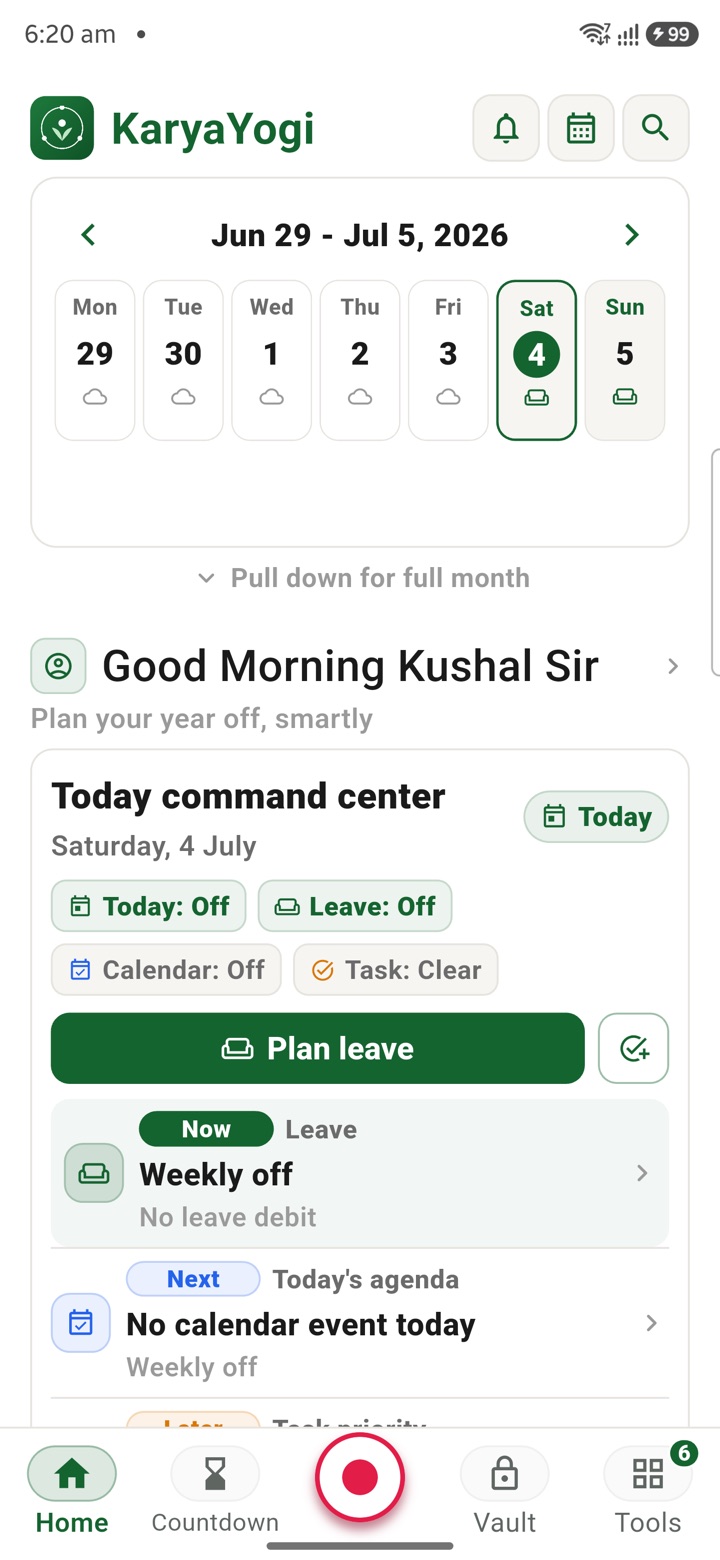
Calendar View brings your planning into one private surface. From the Home calendar strip you see today, the week, holidays, task pressure and quick actions without opening a separate app, and you can expand to a full month or switch between Day, Agenda, Week, Month and 6 Months views depending on how much density you need.
Calendar Sources let you turn layers such as My Events, Holidays, Government Days, APAR, Countdowns and Imported items on or off by context. You can add an event in plain language, for example "lunch at office at 3 pm tomorrow", and KaryaYogi parses the title, date and time for you to confirm before saving.
KaryaYogi keeps its own calendar data separate, so your planning is not written into Google, Apple or other phone calendars unless you choose to import.
Officer workflow
How an officer uses it
A real sequence — from opening the tool to a private, review-ready draft.
Start from the Home calendar strip to see today, the week, holidays, task pressure and quick actions without opening a separate app.
Expand to full month or switch between Day, Agenda, Week, Month and 6 Months when the officer needs more or less density.
Open Calendar Sources to turn My Events, Holidays, Government Days, APAR, Countdowns and Imported items on or off by context.
Add an event naturally, such as “lunch at office at 3 pm tomorrow”, then let Karya Yogi parse title, date and time before you confirm.
Use the full editor for start/end time, color, emoji badge, repeat and alerts, then keep the final plan private inside Karya Yogi unless official submission is needed elsewhere.
Why it earns its place
What you get out of it
- Stop paying for expensive premium calendar workflows when the officer needs a secure, service-specific calendar, agenda and task command center.
- Invite colleagues, juniors and others into the meeting plan while keeping service work separated from international cloud calendar servers.
- See holidays, government days, imported items, leave plans, APAR markers, countdowns and personal events as separate sources instead of one confused calendar.
- Master process before outcome: a Karya Yogi is master of calendar and task, because disciplined sequencing decides whether work moves.
Bring your phone calendar into Karya Yogi, plan duty days, meetings, holidays, leave and tasks p
Calendar View
- Working area
- Home calendar strip, full month view, agenda stack, day view, six-month planner, calendar sources and natural-language event creation
- Screen proof
- Nine fresh Android screenshots from the Karya Yogi Calendar View flow, captured from the live app gallery on 26 June 2026
- Officer context
- For officers who move between field visits, reviews, hearings, holidays, leave blocks and task deadlines, the calendar becomes the daily command map before the day becomes chaotic.
- How it operates
- Karya Yogi can read imported phone calendar context into the planning view, but Karya Yogi events, leave plans, APAR markers, countdowns and officer tasks do not get pushed back to Google, Apple or the phone calendar.
Straight answers
Questions officers ask about Calendar View
No. KaryaYogi keeps its calendar data separate by default, so entries are not written into your phone calendars unless you choose to import.
Yes. You can enter something like "lunch at office at 3 pm tomorrow" and KaryaYogi parses the title, date and time for you to confirm before saving.
They are toggleable layers such as My Events, Holidays, Government Days, APAR, Countdowns and Imported items that you turn on or off by context.
In the same shelf
Related tools
Leave Management
Plan leave, find holiday bridges, check CL/RH/EL-style balances, create checklists and prepare a
Leave Planning
Build phone-first draft leave plans, bridge suggestions, EL options, family travel notes and ret
All Holidays
Browse central holiday lists, swipe to the next date and start a private leave plan from the hol
Carry your desk in your pocketअपनी डेस्क, अपनी जेब में
The Android APK below is the legacy direct-download edition. Use it only for an installation originally obtained from this website. Google Play and iOS releases follow separate testing and review tracks.
नीचे दिया गया Android APK पुराना सीधे डाउनलोड वाला संस्करण है। इसे केवल उसी इंस्टॉलेशन के लिए उपयोग करें जो इस वेबसाइट से लिया गया था। Google Play और iOS रिलीज़ की अलग परीक्षण और समीक्षा प्रक्रिया है।
Legacy package in.karyayogi.app · v1.55.59 (8195) · 144 MB · Android 8.0+