Utility & Personal Tools

Panchang & Muhurat (Official Edition)

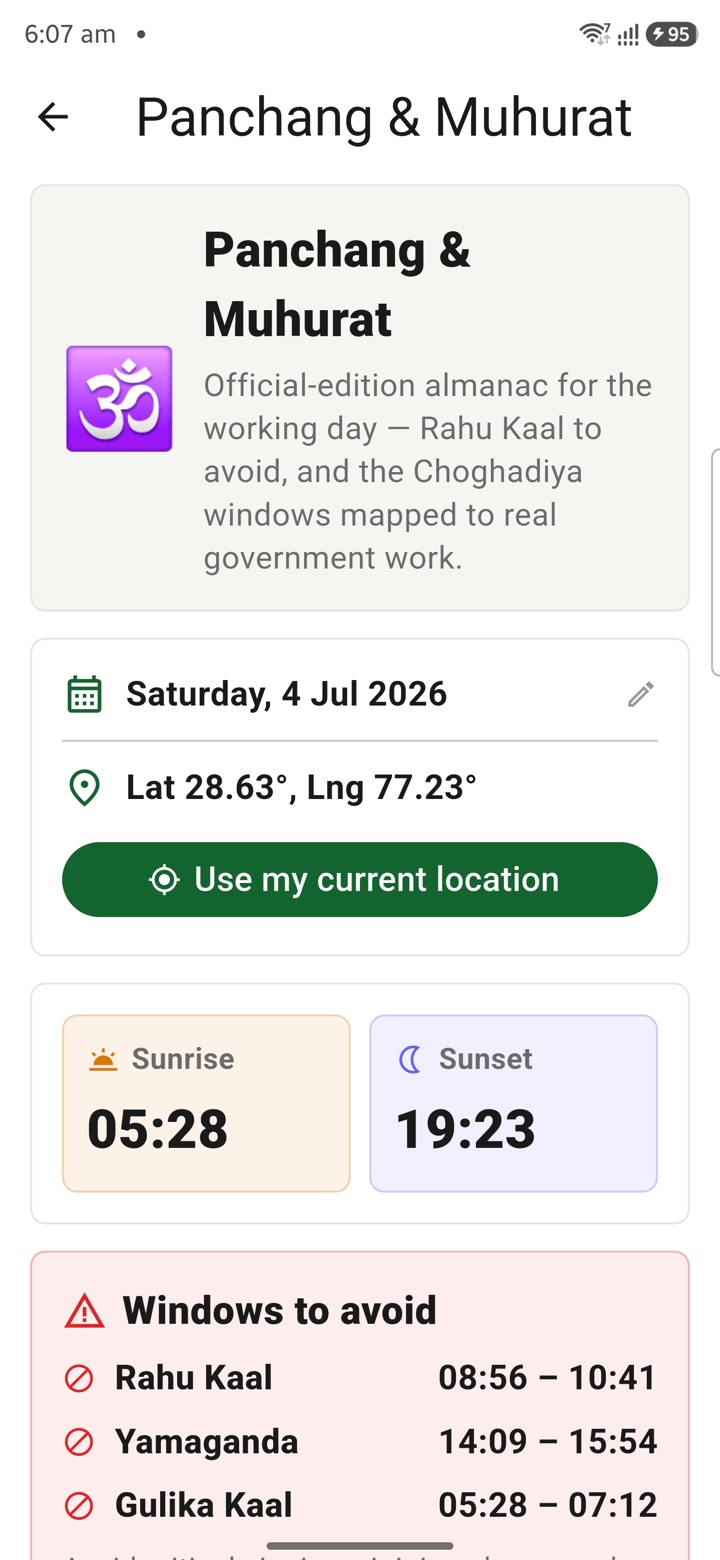
An official-edition almanac for the working day: sunrise, sunset, Rahu Kaal to avoid, day Choghadiya and Shubh Muhurat mapped to real government work — signing files, joining charge, Vigilance submissions, DPC and tenders.

पंचांग व मुहूर्त (आधिकारिक संस्करण)

कार्य-दिवस के लिए आधिकारिक संस्करण पंचांग: सूर्योदय, सूर्यास्त, टालने योग्य राहु काल, दिन की चौघड़िया और वास्तविक सरकारी कार्य से जुड़ा शुभ मुहूर्त — फ़ाइल हस्ताक्षर, पदभार ग्रहण, सतर्कता प्रस्तुति, DPC और निविदाएँ।

Panchang & Muhurat (Official Edition) hero image
PKPanchang & Muhurat (Official Edition)

Simple explanation

Panchang reads your day as an officer reads a tour programme — slot by slot. From your date and location (GPS, or New Delhi as a fallback) it computes sunrise and sunset, the windows to avoid (Rahu Kaal, Yamaganda, Gulika Kaal), and the day Choghadiya. Each Choghadiya slot is mapped to a concrete government activity: Amrit and Shubh are read as windows for signing critical policy files, joining a new posting or charge, and submitting files to the Ministry or Vigilance; Labh covers tender and contract negotiation, DPC work and financial sanctions; Char suits inspections, tours and field visits; Udveg, Kaal and Rog are flagged to avoid critical signings and instead clear routine backlog and dak. It is traditional almanac guidance for planning only — your office order, posting orders and statutory timelines always come first.

Open the tool, add the basic details, and the app shows the next useful step. It does not replace your office order. It helps you prepare before you talk to your office, accounts section or reporting officer.

The main idea is control. Your dates, notes and personal inputs stay with you unless you decide to share them.

सरल समझाइए

पंचांग आपके दिन को वैसे पढ़ता है जैसे एक अधिकारी दौरा-कार्यक्रम पढ़ता है — स्लॉट दर स्लॉट। आपकी तिथि और स्थान (GPS, या विकल्प में नई दिल्ली) से यह सूर्योदय-सूर्यास्त, टालने योग्य खिड़कियाँ (राहु काल, यमगण्ड, गुलिक काल) और दिन की चौघड़िया की गणना करता है। हर चौघड़िया स्लॉट एक ठोस सरकारी कार्य से जुड़ा है: अमृत और शुभ को महत्वपूर्ण नीतिगत फ़ाइलों पर हस्ताक्षर, नई पोस्टिंग या पदभार ग्रहण, और मंत्रालय या सतर्कता को फ़ाइल प्रस्तुति की खिड़की माना जाता है; लाभ निविदा-अनुबंध वार्ता, DPC कार्य और वित्तीय स्वीकृतियों के लिए; चर निरीक्षण, दौरे और क्षेत्र-भ्रमण के लिए; उद्वेग, काल और रोग में महत्वपूर्ण हस्ताक्षर टालें और सामान्य बैकलॉग व डाक निपटाएँ। यह केवल नियोजन हेतु पारंपरिक पंचांग मार्गदर्शन है — आपका कार्यालय आदेश, पोस्टिंग आदेश और वैधानिक समय-सीमाएँ हमेशा सर्वोपरि हैं।

Tool खोलें, basic details दें, और app next useful step दिखाता है। यह office order की जगह नहीं लेता। यह office, accounts section या reporting officer से बात करने से पहले तैयारी में मदद करता है।

Main idea control है। आपकी dates, notes और personal inputs आपके पास रहते हैं, जब तक आप खुद share न करें।

Feature explainer

This feature takes a messy everyday job and turns it into a clear app path. It shows the important information first, keeps the next action close, and connects with calendar, tasks, countdowns or profile details when that helps.

Feature explainer

यह feature रोज के messy काम को clear app path में बदलता है। यह important information पहले दिखाता है, next action पास रखता है, और जरूरत होने पर calendar, tasks, countdowns या profile details से जोड़ता है।

Why it helps government users

  • Sunrise, sunset and Rahu Kaal in one working-day view.
  • Choghadiya mapped to real tasks — signing files, joining charge, DPC, tenders, Vigilance submissions.
  • A calm way to sequence critical and routine work across the day.
  • Planning aid only — office order, posting orders and statutory timelines always take precedence.

Government user को लाभ

  • सूर्योदय, सूर्यास्त और राहु काल एक कार्य-दिवस दृश्य में।
  • चौघड़िया वास्तविक कार्यों से जुड़ी — फ़ाइल हस्ताक्षर, पदभार ग्रहण, DPC, निविदाएँ, सतर्कता प्रस्तुति।
  • दिन भर महत्वपूर्ण और सामान्य कार्य क्रम में रखने का शांत तरीका।
  • केवल नियोजन-सहायता — कार्यालय आदेश, पोस्टिंग आदेश और वैधानिक समय-सीमाएँ सर्वोपरि।

How to use

  1. Pick a date and use your current location, or let it fall back to New Delhi.
  2. Tap Compute panchang to see sunrise, sunset and the windows to avoid.
  3. Read the day Choghadiya — each slot is mapped to a government activity.
  4. Plan critical signings, joining charge and Vigilance submissions for the Amrit/Shubh windows.
  5. Keep routine backlog and dak for the Udveg/Kaal/Rog windows.

कैसे use करें

  1. तिथि चुनें और अपना वर्तमान स्थान उपयोग करें, या नई दिल्ली विकल्प रहने दें।
  2. सूर्योदय, सूर्यास्त और टालने योग्य खिड़कियाँ देखने के लिए पंचांग की गणना करें टैप करें।
  3. दिन की चौघड़िया पढ़ें — हर स्लॉट एक सरकारी कार्य से जुड़ा है।
  4. महत्वपूर्ण हस्ताक्षर, पदभार ग्रहण और सतर्कता प्रस्तुति को अमृत/शुभ खिड़की में नियोजित करें।
  5. सामान्य बैकलॉग और डाक को उद्वेग/काल/रोग खिड़की के लिए रखें।

At a glance

  • 🔒
    Stays on your deviceNo account, no server profile, no tracking.
  • 🌐
    English & हिंदीEvery screen works in both languages.
  • 🌗
    Light & darkComfortable to read in any lighting.
  • One-tap next stepThe useful action is always close at hand.

एक नज़र में

  • 🔒
    आपके device पर रहता हैकोई account, server profile या tracking नहीं।
  • 🌐
    English और हिंदीहर screen दोनों भाषाओं में काम करती है।
  • 🌗
    Light और darkकिसी भी रोशनी में पढ़ने में आरामदायक।
  • One-tap next stepuseful action हमेशा पास रहता है।