The experience
Make the app your ownऐप को अपना बनाएँ
Reorder tools, hide the ones you never touch, and choose which four tabs sit at the bottom.टूल्स को पुनर्व्यवस्थित करें, अनुपयोगी छिपाएँ, और तय करें कौन-से चार टैब नीचे रहें।
Put your work first
Drag your tools into the order you actually work in
KaryaYogi opens with its full tool library. No two officers use them the same way, so the order is yours to set. Press and hold any tool, then drag it up or down the grid until your most-used tools sit at the top where your thumb lands first.
The order you set is the order you get, every time you open the app. It lives on your device, so it holds even with the SIM removed and no network in sight.
- Press, hold and drag to move any tool
- Keep the tools you open daily at the top of the grid
- The order is remembered between sessions, offline included
- Rearrange as often as your work changes
Clear the clutter
Hide the tools you never use, without losing them
Some of the tools may not fit your posting or your desk. Hiding a tool takes it out of your everyday view so the grid stays short and relevant to the work in front of you.
Hiding is not deleting. A hidden tool is set aside, never removed, and you can bring any of them back at any time. Nothing you build inside a tool is lost when you hide it.
- Hide any tool that does not fit your role
- Hidden tools are set aside, not deleted
- Restore any tool whenever you need it again
- Your data inside a tool stays intact while it is hidden
Your bottom bar
Choose the four tabs that sit at the bottom
The bar along the bottom holds four tabs, always within thumb reach. You decide which four they are, so the tools you reach for a dozen times a day are one tap away instead of buried in the grid.
Swap a tab out for another whenever your priorities shift. There is room for exactly four, which keeps the bar honest: it holds what matters now, not everything at once.
- Pick the four tools that earn a permanent tab
- One tap to your daily tools, no scrolling
- Swap any tab out as your work changes
- Four slots keep the bar focused, not crowded
One screen, full control
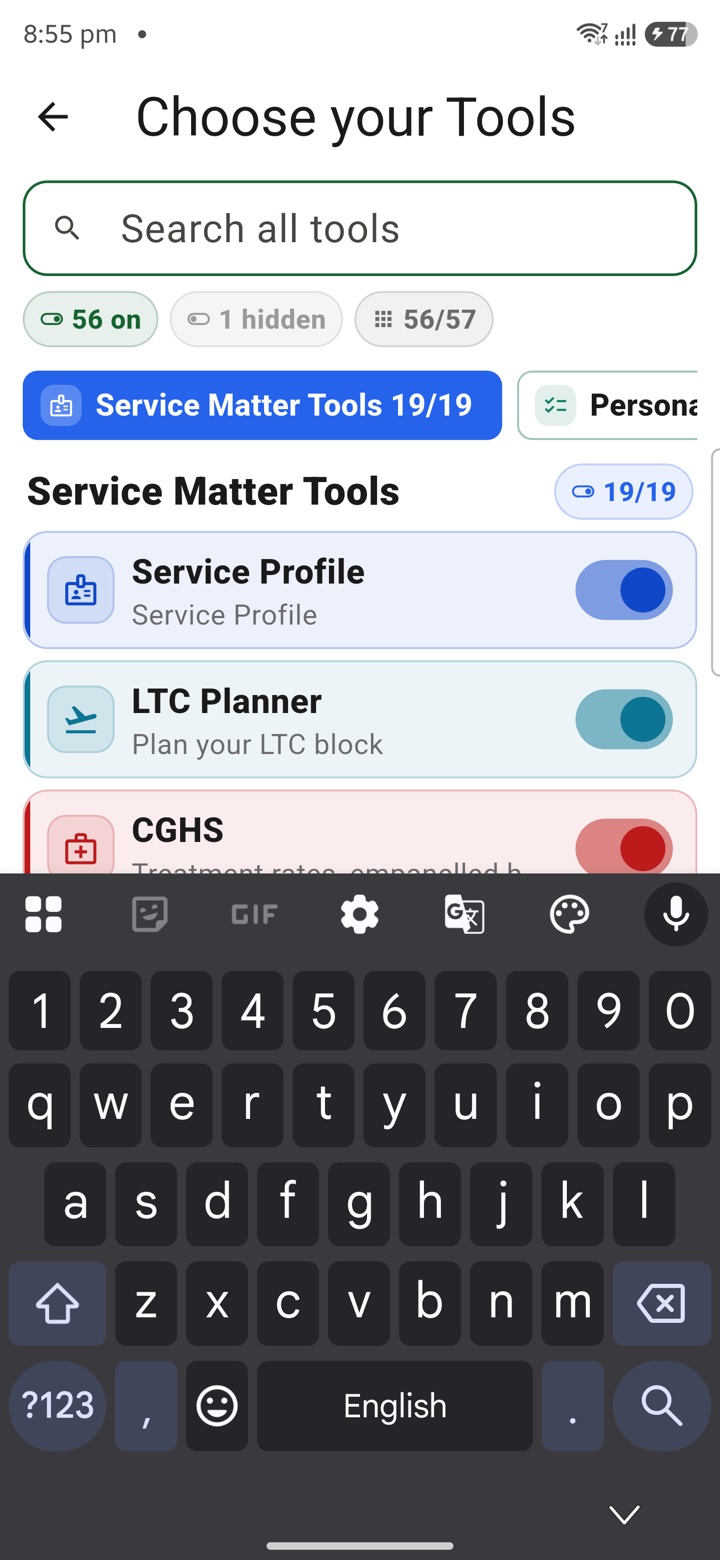
The Choose your Tools screen keeps a running count
Reordering, hiding and tab choices all come together on one Choose your Tools screen. It is the single place where you shape the whole surface, so you are never hunting through settings to make one small change.
As you work, the screen keeps a live tally of how many tools are on and how many are hidden. You always know exactly how much of KaryaYogi is in your active view and how much you have set aside, and you can adjust until it reads the way you want.
- Reorder, hide and set tabs all in one place
- A live count shows tools on and tools hidden
- See at a glance how much is in your active view
- Every choice lives on your device, no account needed
Carry your desk in your pocketअपनी डेस्क, अपनी जेब में
The Android APK below is the legacy direct-download edition. Use it only for an installation originally obtained from this website. Google Play and iOS releases follow separate testing and review tracks.
नीचे दिया गया Android APK पुराना सीधे डाउनलोड वाला संस्करण है। इसे केवल उसी इंस्टॉलेशन के लिए उपयोग करें जो इस वेबसाइट से लिया गया था। Google Play और iOS रिलीज़ की अलग परीक्षण और समीक्षा प्रक्रिया है।
Legacy package in.karyayogi.app · v1.55.59 (8195) · 144 MB · Android 8.0+