The experience
The Today command centerआज का कमांड सेंटर
One home screen that answers 'what does my day need?' — work status, health, leave and the week ahead.एक होम स्क्रीन जो बताती है 'आज क्या ज़रूरी है' — कार्य, स्वास्थ्य, छुट्टी और आने वाला सप्ताह।
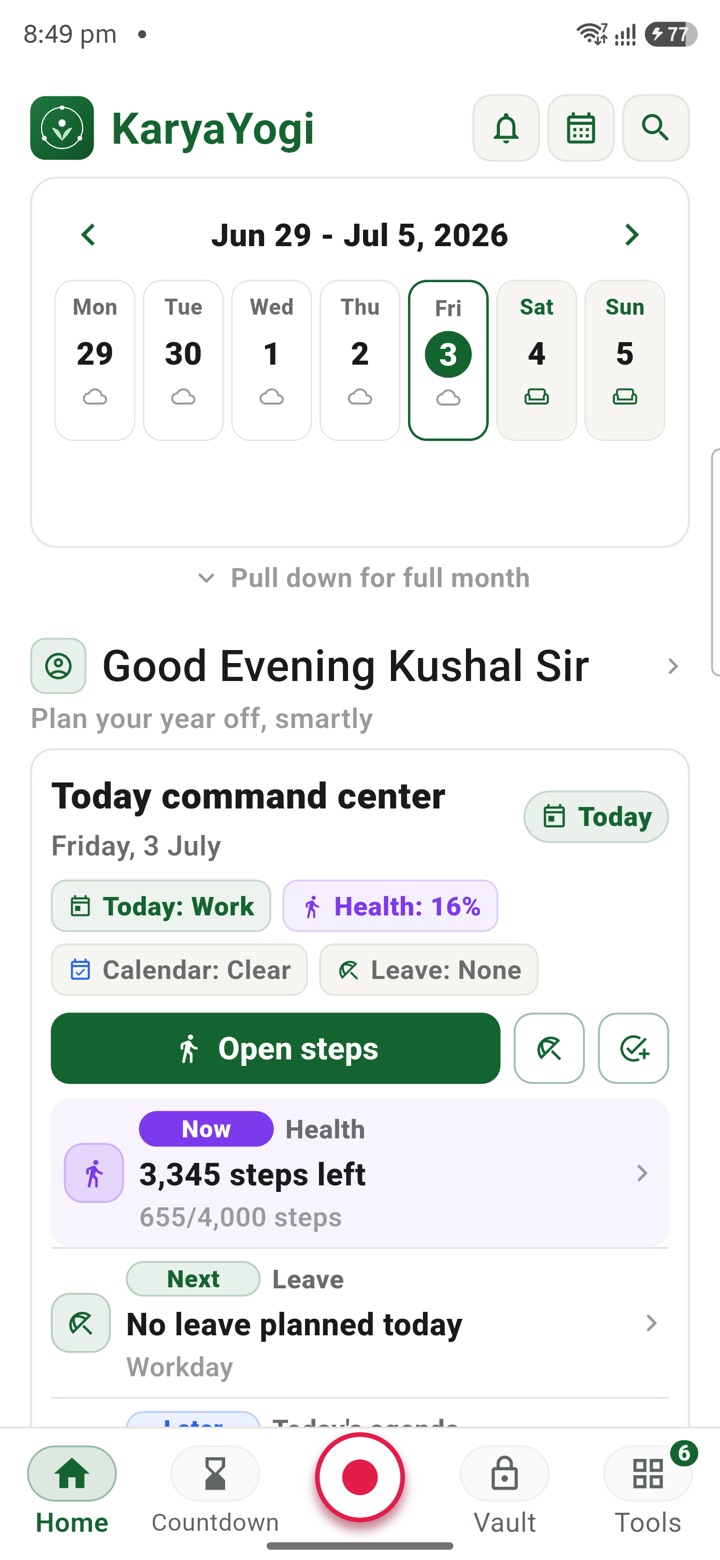
The first screen of the day
One glance answers "what does my day need?"
Today is the screen KaryaYogi opens to. It is built to answer one question before you have finished your first cup of tea: what does this particular day actually need from me? Instead of a wall of icons, it gives you a short, honest read of the day — whether it is a working day or a holiday, how your health rings are tracking, where your leave stands, what is on the calendar, and the week laid out as a strip you can thumb across.
Everything on Today is a private planning view drawn from what you have entered into the app. It reflects your own records and estimates — it does not connect to eOffice, HRMS or any official system, and it does not file or submit anything. It is your morning briefing to yourself.
Because KaryaYogi is offline-first, Today works with the SIM removed. The screen renders from your local, encrypted vault, so it loads the same on a train, in a field posting or inside a building with no signal.
- Opens straight to a plain-language read of the day, not a menu
- Renders from your own entries — a planning view, never an official record
- Works fully offline; no network needed to see your day
Work or holiday, health, and leave
The three things you check first, stacked at the top
The top of Today carries the status you glance at most. A clear work-or-holiday marker tells you whether the day is a scheduled working day, a weekend or a holiday you have recorded, so you know at a glance whether to plan office work or personal time.
Below it sit your health rings — a simple visual of how your day is tracking against the movement and activity targets you set. They are a private nudge, filled from what you log, and are meant for your own wellbeing, not for reporting to anyone.
Your leave status is shown as a running read of your recorded balance and any leave you have planned. As with every tool, this is your own working estimate for planning purposes; it is not a sanction, not an official leave account, and it does not apply for or approve anything.
- Work-or-holiday marker for the current day, from your own calendar
- Health rings that fill from what you log, kept private to you
- Leave shown as your planning estimate, not an authorised leave account
- Nothing here is submitted, filed or shared automatically
Calendar and the week strip
See today in the shape of the week
Under the status band, Today shows your calendar for the day — the entries and reminders you have set — so the day's commitments sit next to the day's status. It keeps planning and awareness on the same screen instead of behind another tap.
The week strip runs across the screen as seven days you can move through with your thumb. Tap any day to see what it holds; the strip keeps the current day in view so you always know where you are standing in the week. It is designed for quick orientation — a fast sideways read rather than a deep dive.
- The day's calendar entries and reminders shown inline on Today
- A seven-day strip you swipe across for the week at a glance
- Tap a day to open it; the current day stays anchored in view
Pull down for the full month
The month is one gesture away
When you need more than the week, pull the screen down. The week strip expands into a full month view, so you can plan across weeks — spotting holidays, clustered commitments and stretches of leave — without leaving Today. Release or scroll back up and it collapses again to the compact strip.
This keeps the everyday view light while the fuller picture stays one gesture away. Whatever you see there — dates, leave, holidays, health — is your own data held in KaryaYogi's encrypted local vault, controllable through app lock and a one-tap encrypted backup you keep.
- Pull-down gesture expands the week strip into a full month
- Plan holidays, commitments and leave across weeks in one place
- Collapses back to the compact week strip when you are done
- All of it drawn from your private, on-device encrypted data
Carry your desk in your pocketअपनी डेस्क, अपनी जेब में
The Android APK below is the legacy direct-download edition. Use it only for an installation originally obtained from this website. Google Play and iOS releases follow separate testing and review tracks.
नीचे दिया गया Android APK पुराना सीधे डाउनलोड वाला संस्करण है। इसे केवल उसी इंस्टॉलेशन के लिए उपयोग करें जो इस वेबसाइट से लिया गया था। Google Play और iOS रिलीज़ की अलग परीक्षण और समीक्षा प्रक्रिया है।
Legacy package in.karyayogi.app · v1.55.59 (8195) · 144 MB · Android 8.0+